
Project Description
Overview
Diakonia Core is a custom WordPress plugin built by Evolve for a multi-region faith education program. It extends LearnDash into a full training operations platform so students can register and pay for classes, and staff can manage enrollments, attendance, payments, and completion in one place.
Instead of running the program across spreadsheets and a legacy system, Synods, Communities, and Classes now live inside WordPress with clear roles for Admins, Synod Admins, Community Managers, Instructors, and Learners.
The Problem
The organization needed to move its diaconal training program onto WordPress and LearnDash, but a standard LMS was not enough.
They needed to support:
- Multiple Synods (regions) and Communities
- Classes tied to courses, instructors, schedules, and session requirements
- Online registration and per-Synod course fees (card or check)
- Session-by-session attendance with automatic Pass / Completed rules
- Staff who should only see their Synod or Community — not the whole network
- Rosters, coupons, certificates, and instructor materials
- Migration of historical members, classes, enrollments, fees, and attendance
Without a custom layer, the LMS could teach content but it could not run the real day-to-day operations of the program.
What Was Built
Evolve built Diakonia Core as the operational backbone of the program:
- Organizational structure: Synods, Communities, and Classes linked to LearnDash courses
- Enrollment lifecycle: register, track payment status, completion readiness, and completed dates
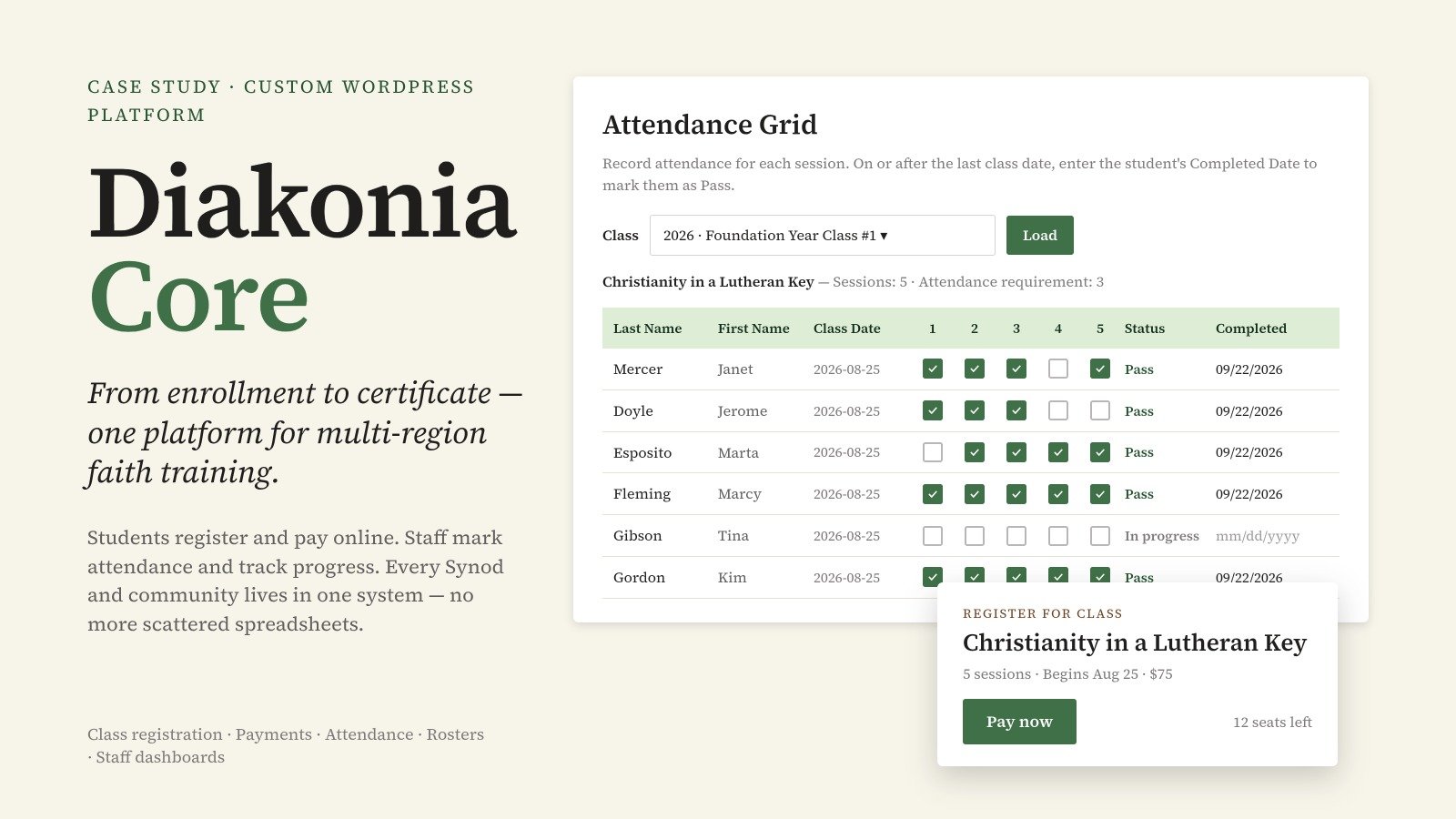
- Attendance Grid: mark sessions by class; auto Pass / In progress; Completed Date when fees are paid
- Payments & coupons: Synod-specific Stripe checkout, already-paid protection, secure payment confirmation
- Role-based staff access: Synod Admin, Community Manager, Instructor, and Admin dashboards with scoped permissions
- Rosters & reports: class lists with CSV export
- Certificates & materials: completion emails; instructor uploads with student digests
Legacy migration: members, synods, communities, courses, classes, enrollments, fees, and historical attendance imported into WordPress
End-To-End Flow:
Class setup → Student registers → Pays (or check pending) → Staff mark attendance → Pass → Paid + Pass = Completed → Certificate / reports
Technical Notes
- Stack: WordPress, LearnDash LMS, custom PHP plugin, Stripe, REST API, MySQL
- Custom data: enrollments, attendance, payments, coupons, upload logs
- Security: capability checks, nonces, ownership validation, already-paid blocks on UI + API, Stripe PaymentIntent verification (amount, currency, enrollment, user, purpose), webhook-ready confirmation
- Access control: role capabilities scoped by Synod / Community / instructor assignment
- Admin UX: LearnDash-integrated menus for Enrollments, Attendance Grid, Rosters, Coupons
- Frontend: class registration + checkout shortcodes on class pages
- Migration tooling: scripts for members, synods, communities, courses, classes, enrollments, and fees
For Learners
Learners get a simple path without needing to understand the admin system:
- Browse and open a class page
- Log in and Register for this class
- See payment status (pending / paid)
- Pay online with card when the Synod enables Stripe (optional coupon)
- Or follow check / cash instructions when online payment is not used
- Progress toward Pass based on attendance
- See confirmation when enrolled and paid
- Receive certificate notification when completion is ready
In short: register → pay → learn → complete — all on the same site.
For Community Manager
Community Managers run their local community without seeing the whole network:
- View enrollments for their community’s classes
- Open the Attendance Grid for those classes
- Mark session attendance and save
- Track payment and completion status for their students
- Help manage class-related operations within their community scope
- See only what belongs to their assigned community
In short: day-to-day class and student management for their community.
For Synod Admin
Synod Admins oversee an entire region:
- Manage classes and enrollments across their Synod
- Mark attendance for Synod classes
- Confirm / monitor payments and use Synod coupons
- View rosters and export reports
- Configure Synod settings (fees, Stripe keys, contacts) as needed
- Cannot access other Synods’ data
In short: full regional control — students, classes, fees, and reports — within their Synod.
For Admin (Site / Program Admin)
Admins have full program oversight:
- Access all Synods, Communities, Classes, and enrollments
- Configure roles, structure, and platform-wide settings
- Oversee payments, attendance, rosters, and coupons across the network
- Support staff and resolve edge cases
- Own migrations, plugin updates, and production configuration (e.g. Stripe webhook)
In short: the whole program in one control panel.
